

1 – STOP PRODUCING
I used just 3 simple steps to become paperless – stop producing, stop receiving, and stop collecting. Keep reading if you want further explanation the first step. I know it is not quite as easy as one, two, three, especially if you are a paper lover like I was. It will take constant effort to transition away from all the paper. Let’s get started.
Start with Why
As Simon Sinek says in his inspiring TED Talk, along with his book, we should start with why. You need to know why you are putting yourself through this transition. Just like a diet, the goal is to be healthier, but why do you want to be healthier? To live longer? To thrive, not just survive? To have more energy? To look better, or to boost your confidence
Like a goal to be more health conscious, know why you want to improve your digital fitness. If you’re like me, you might have a desire to change an industry. Maybe you want to simplify. Maybe you want to push yourself to learn something new. Maybe you want to save time and become more efficient. Maybe you want to help save the planet. These reasons, and more specifically your own, can all help you go paperless.
Whatever your reason, take a few minutes and write it down. Don’t write it on paper, start the transition now. Write down your reasons to go digital and make this list your background on your PC desktop or your phone. Check out Canva for a simple free background maker.
What's Your Paper Weight?
Now that you know your reason, you should know how much paper you use and where it comes from. In other words, what is your paper weight? On average each office employee uses 100 lbs. of paper a year or 10,000 sheets. I helped someone who printed roughly 50,000 sheets a year to cut the habit, so I know you can too.
For a week, track your paper usage. Every time you use a piece of paper, add it to your list. To keep track, use a notepad app on your phone or try out the free excel app (iOS/Android). (If you want to keep the diet analogy going, you could actually go as far as using a simple calorie counting app (iOS/Android) on your phone. Remember, each calorie represents a page.
As important as writing down the number of pages you print, is documenting the activity that produces those pages. Those activities are the actual processes you will need to shift to a digital solution before you go paperless.
What are Your Top Producers?
After you have tracked your paper production for about a week, list your top producers. My top producers included:
- Note taking – I carried around a portfolio to write down my notes. These were notes I rarely revisited.
- Tasks – I relied on sticky notes to track all my tasks. I placed a sticky notepad in my back pocket and spent more time sorting through my to-dos than actually doing them.
- Document storage – If I wanted to read something later, I printed it out and put it in a stack, a stack that I never returned to.
- Plans and specs – The construction industry uses one of the most ineffective ways to communicate information in construction drawings, and after we receive these plans, we just love to hang onto them, even if we are no longer working on the project.
Some other processes you may have to work towards digitizing include:
- Agendas/meeting minutes – How many of us still print an agenda prior to every meeting for every attendee and then print out the meeting minutes afterwards? Most of the paper agendas/minutes are a complete waste. And don’t get me started on the meeting itself.
- Paper checks/monetary transactions – Fewer and fewer transactions take place using paper (like receipts) and paper checks, but they still exist today.
- Proposals/reports – Many clients still require the submission of paper copies of all reports and proposals, which creates duplicate effort and inefficiencies.
- Working copies – We often print out documents to confirm the visual once printed, or because “I can just read better when its printed.”
While this is by no means represents a comprehensive list, it will help you get started. I am confident you have additional producers to add to the list I provided, and if I am missing something important, please include your feedback in the comments below.
Get Going Already
Prioritize your list of producers based both on the number of pages produced and, more importantly, the ease of eliminating the producer and finding an alternative digital solution. When prioritizing, select the producer that will provide the quickest return. You need quick wins to get into a habit and stop the cycle. Once you have established your priority list, begin to eliminate each producer one-by-one. Below are examples of alternative methods for each of the processes
- Note taking – Digitizing note taking is critical to successfully becoming paperless. I use Microsoft OneNote because it integrates with both my work and my personal life. OneNote allows access to my notes on any device. OneNote has apps for my phone, my Microsoft Surface, and the Web. Best of all, OneNote is free and includes 5GB of storage. Other great apps to try include Evernote and Google Keep.
- Task list – Finding a replacement for my sticky notes was not easy. I tried everything from Outlook tasks to Google tasks to find a suitable way to remember the milk, to other apps of the month I stumbled upon. Nothing seemed to stick until I tried Trello. I think this program stuck because it works the way my mind works. Trello uses boards and lists with tasks flowing from list to list as they progress. Other great apps include Wunderlist, Any.DO, Todoist, and Microsoft To Do. You can also just use a note taking app.
- Document storage – Finding a replacement for the filing cabinet is critical to your conversion to paperless. First, think about a cloud storage solution. I have used just about every cloud storage platform out there. As I finished my dissertation, I finally standardized on one platform, Microsoft OneDrive. This is due to a deep integration with Microsoft Office and Office 365. OneDrive allows for online and desktop co-authoring of documents. Some other options to evaluate include Google Drive, Box and Dropbox.
- Article storage – As stated above, I used to print out every article that I wanted to keep for later. Now, I use Pocket. Pocket is great because it lets you save content from many different sources to read later. It typically converts the content into an easy-to-read format and will even read the content aloud if you choose that option.
- Plans and specs – In our industry, digitizing plans and specs is a necessity. Bluebeamhas quickly become the industry standard. Bluebeam can typically replace multiple high-priced tools. Bluebeam allows for collaboration through its studio. PlanGrid is another option worth considering. You could also use something as simple as Microsoft Edge to provide mark-ups to plans.
- Agendas/meeting minutes – Agendas and minutes should be included with the invite, along with a note stating the need to conserve paper and that no printed agendas will be provided. If you choose, it is possible to tie your OneNote notebook directly to the invite.
- Monetary transactions – We are reducing our reliance on printed money. Why not use your credit or debit card? Consider mobile payment methods such as Android pay, Apple pay, PayPal and Venmo. In fact, mobile payments are typically faster than using the chip in your credit card. Try it out a few times and you may actually love it.
- Proposals/reports – This is probably the one of the most difficult to eliminate and may be one of the last processes to transition as we often have client requirements. With that said, talk to your clients during the RFI period in an effort to determine if an electronic submissionis acceptable. If not, that’s okay for now, we can let it be our last producer.
- Working copies – Rather than printing out a working copy, think of the electronic version as your final draft. It is likely that the consumer of the information will be using a device to consume the information anyway. If you need to work through a thought, consider a white board and snap a picture of it using office lens (iOS/Android)
Hardware
While some hardware such as a two-in-one or tablet PCs may make the transition to paperless easier, having one is not completely necessary. I was able to transition to paperless with a Dell laptop and a smart phone. It is all about motivation.
You're Just Getting Started
You’re Just Getting Started
2 – STOP RECEIVING
It only takes 3 simple steps for you to become paperless – stop producing, stop receiving, and stop collecting. Read below if you need help to stop receiving all the paper. This is likely the hardest step and will take more effort than to stop producing.
Where does it all come from?
To stop receiving paper is challenging because of the multitude of sources that bring paper into our lives. We often lose momentum after completing the first step. The biggest culprits helping add more paper include newspapers, magazines, receipts, bills, junk mail, and even our colleagues. Below are a few strategies to get rid of each source. Work your way through each source and slowly but surely you will stop receiving paper.
- Newspapers – Let’s start with the simplest. Cancel all your newspaper subscriptions period. While it will not dramatically reduce the amount of paper you receive, it’s an easy place to start. And we need quick wins. I remember in college when I would spend almost an hour a day reading the college paper. Thinking back, what a waste of time. There are many better ways to keep up with local and world events.
Consider using an app on your phone or visit a news website at lunch. Some great news appsinclude Inkl (iOS, Android), Google News (iOS, Android), and Flipboard (iOS, Android). Most newspapers today have transitioned to online media in addition to print such as the USA today, the Wall Street Journal, and the Washington Post. Find your news source and bookmark it in your browser or subscribe to it (which may cost a few dollars) and get it in your email inbox.
Another app I use every week is Pocket (iOS, Android). It’s a great little app that let’s you save content to read later. It typically converts the content into an easy to read format and will even read it aloud if you wish. Even with this you may still get a paper or two at your doorstep. I still get our free local paper despite never asking for it. I think ads are keeping it alive.
- Magazines – Just like the newspaper, cancel your magazine subscriptions. Most of the news apps above also contain magazine articles – particularly, Flipboard (iOS, Android). Other apps to check out include Kindle (iOS, Android) and Zinio (iOS, Android). The kindle app lets you subscribe to the kindle edition right on Amazon.
- Receipts – Start by saying “no thank you” to the receipts every chance you get. If it’s still handed to you, look for the closest trash can. If you need to keep it for some reason like an expense report, snap a quick picture of it using Office Lens (Windows, iOS, Android). Also, consider your payment method, using digital payment methods such as Square will email you a receipt rather than the paper version.
- Bills – Every time you open a new account make sure you sign up for paperless billing right away. Typically, you can setup auto withdrawals from your checking account. Which not only saves you the hassle of paying your bills, but in some cases, will even give you a discount. You can even use a service like Mint to let you see and pay all your bills in one place. I have been a Mint user for years and love it. For those pesky accounts that don’t allow online bill pay, I recommend using your bank to mail the check for you. I used my PNC account for years to mail a check for my water bill until they finally started accepting online payments.
- Junk Mail – One of the most frustrating things for a paperless person is the mailbox and the amount of junk mail you get. Start by going to dmachoice.org to turn off the faucet. Get rid of credit card offers for good with optoutprescreen.com. Try out the PaperKarma App (iOS, Android) which lets you take a picture to opt out of unwanted mail. I used it just tonight. Lastly, contact the culprits directly via their website or email. This worked for balance transfer checks from my credit card that showed up every week. Check out these other sites (1, 2, 3) for more ideas on how to rid yourself of junk mail.
- Colleagues – I don’t have a great solution for this one except to explain to them that you are trying to cut down on your paper use. If they print out something to give you, just remind them to please email it to you so that you can help keep track of it better. Finally, if you want to be a little more active in stopping the influx, do not respond to anything physically handed to you. Conveniently lose the physical copy, while quickly responding to all digital communication
Schedule time for this
The steps above may not stop every single piece of paper you receive, but it will get you a long way toward that goal. For the paper you still receive, make sure you batch it. Meaning, let it collect for a little while and then sort it quickly to dispose of it. Schedule your batching once a week.
Hopefully you found the resources above helpful. If you did please share it. Maybe even share it with that colleague that keeps printing out emails and putting them on your desk. You know who I’m talking about.
3 – STOP COLLECTING
Your final of the 3 simple steps to help you become paperless – stop producing, stop receiving, and stop collecting. Dive into that last step – stop collecting. This is likely the easiest step, but it will take the most time because its rarely urgent.
Take inventory – Plan and set milestones
Do not spend too much time on taking inventory. While it’s important to have a strategy, it’s more important to get going. A few methods to consider to organize yourself are: room by room, media type by media type, box by box, or stack by stack. Once you have a basic approach, set a time table for yourself. Is it a box a week, a room a month or all your photos in a quarter? Set that time table and commit to it.
Your three stacks
As you start going through the first box of paper, divide everything into three stacks:
- Scan – Anything you want to keep.
- Shred – Anything sensitive that can’t get into anyone else’s hands.
- Recycle – Get rid of paper for good.
Once you feel like you have scanned everything you need, divide the remaining paper into shred and recycle stacks. After you shred, you recycle. If you wish, eliminate the paper iteratively. Make your three piles, recycle everything first. Then shred and recycle. Then scan, recycle, and shred, and so on. The key is to just keep the momentum going.
1 - Scan
As you are sorting, the first stack you should create is your scan stack. This stack is for everything you want to keep digitally after you go paperless. The scan pile should be kept to a minimum. Before you put something in the scan stack, ask yourself a few questions. Do I really need this? Can I get this back if recycled, whether that be through printing or purchasing? Has this material become dated? For example, in most cases you only need to keep your last three years of tax records. The rest should go to the next stack – shred. As you continue your paperless journey, you will notice that your scan stack gets smaller and smaller.
Pick your scanner: You literally have thousands of options for scanners. When selecting a scanner, consider questions such as the following: how much paper, what media, how fast (automatic feed, tray size), where to scan (mobility), scan both sides and how much do you want to spend? Balancing these factors will allow you to select your scanner. For more information check out this article from PCMag.
Scanners to consider:
- HP ScanJet – Great scanner for both photos and papers. Flatbed scanners are great for photos, while auto-feed tray speed up the process for documents. If scanning large quantities, consider this option.
- Epson Workforce ES-500W – Good for high volume scanning. OCRs and uploads directly to cloud storage.
- Canon CanoScan 9000F – One of the best scanners focused on photos, film, and negatives.
- Epson Perfection V600 – Amazon’s choice for a photo scanner.
- Fujitsu ScanSnap S1300i – Great compact scanner with duplexing and an automatic document feed
- Brother DS-720D – Economic mobile scanner with duplexing
Even with all these options, you may want to consider just using your cell phone. I typically use my cell phone when I am on the road. Photo scanning apps are getting much better. My favorite scanning app is Office Lens (iOS, Android, Windows). You can use scanners built in to other apps such as Evernote Scannable, OneNote, and OneDrive. What is great about the latter options, is the apps can be used as storage locations for the files. For example, you can use your notebook to store searchable receipts or OneDrive to store images.
2 - Shred
Your next stack is your shred stack. This stack includes paper containing any personal information such as social security number, bank account, and even your phone number and address. If in doubt, shred it before it goes to stack three. But don’t shred every personal document quite yet. Hold on to those hard to replace documents such as birth certificates, social security cards, marriage licenses, wills, titles and deeds. Yes, I know, common sense, but I don’t want to be accused of telling someone to shred their passport.
If you don’t have a shredder, take a few minutes to consider what type to get. Even if you already have a shredder, you may want to get another. The three primary types of shredder include:
- Strip-Cut – Pretty much worthless. With a little scotch tape, you can reassemble a sheet in about five minutes.
- Cross-Cut – A little better but can be reassembled with the right software. It could even be reassembled by hand if determined.
- Micro-Cut – Makes your paper into confetti compared to strips. Think thousands of pieces vs. hundreds with the cross-cut. This is the option you should pick. The only question remains is 6-sheet, 12-sheet, or 17-sheet. And that just depends on how much paper you must shred.
The last option is to have a campfire. I sometimes set my sensitive documents aside until I have a campfire and use them to help get the fire roaring. But typically, a little leftover dryer lint can outperform those pesky credit card transfer checks. So, I should just shred them and toss them in the next stack.
3 - Recycle
Nothing special here. Basically, after you have determined you no longer need a piece of paper because you scanned it, shredded it, or it just was not that important in the first place, go ahead and put it in the recycling bin.
Please do not just put it in the trash. A great secondary benefit of going paperless is helping the environment. Don’t spoil that benefit by adding your paper to a landfill.
Consider the books that collect and clutter your home. First try an e-reader app such as Kindle for your cell phone or tablet. If that does not work go with an actual Kindle Paperwhite (Oasis). I know many people who would rather read on their Kindle than a physical book. Once you have transitioned consider donating the paper copies. Actually, one of the best TED talks I have ever seen was about someone’s love for books.
Pair with a reward
Give yourself a reward for getting rid of all that paper. Don’t just sit mindlessly on the couch, pull up the shredder and start churning through those tax returns from 15 years ago. It fact, recently I have not allowed myself to watch any tv without having a secondary mindless activity to accompany it. Even during the Super Bowl, I was sorting through an old box from college.
My challenge for you
Before getting too deep into your three stacks, find all the locations paper collects in your home. Did you know that each location is a gathering point and can add to your stress and decrease your overall effectiveness. Make sure that you consolidate these gathering points and make sure you do not create any new ones.
Now it’s time to get started. Take it one bite at a time and keep repeating until you have eliminated all paper gathering locations and are down to three stacks that you sort through each week to scan, shred, and recycle.
AN INDUSTRY WITHOUT PAPER
The Problem
The construction industry is broken. What will it take to make radical change in our industry? According to a recent McKinsey & Company report, 98% of mega-projects are over-budget or delayed. The average cost is 80% higher than the original contract value and on average projects are delivered 20 months late. In no other industry would delays and overruns to that extent be acceptable. Why is this just standard practice in construction?
Meanwhile construction productivity continues to decline, the same report shares in the last 20 years, construction productivity declined while manufacturing productivity has increased over 50%. Additionally, based on the consumer price index, construction costs are increasing faster than inflation, while automotive costs are decreasing relative to inflation. This trend is not sustainable.
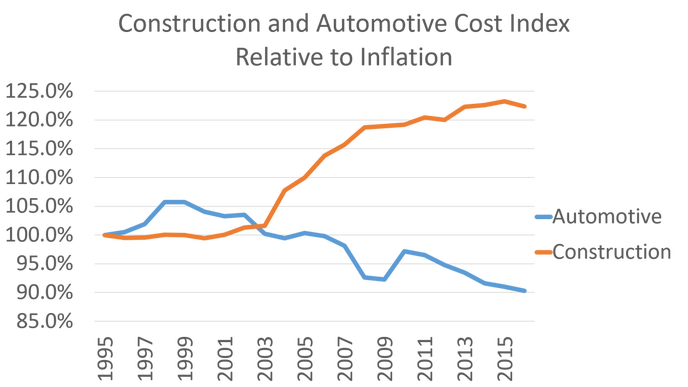
The construction industry is failing because of poor organization, inadequate communication, short-term planning, insufficient risk management, increasing project complexity and misaligned interests. The lack of digitalization of the construction industry only exacerbates the issue. Of global industries, construction is the second least digitalized industry behind hospitality, healthcare, and government (Mckinsey&Company). True digitalization of the construction industry could dramatically improve its overall effectiveness.
Technology Changes - So Must We
Consider for moment the advances in technology over the last 30 years: the fax machine, personal computer, internet, e-mail, and cell phones. But construction has had no significant improvements in productivity. What about the last ten years: smart phones, tablets, cloud computing, drones, and laser scanning?
Yet, no significant productivity improvements have been realized. 3D printing, virtual reality and automation are coming of age, yet without a dramatic shift, these technologies will not provide any productivity improvements. Until we are willing to give up antiquated processes and technology, we will not have any significant productivity improvement. Consider all the technology that has become obsolete around your home: VHS, CDs, DVDs, iPod, and standalone GPS. What about your business? Fax machines have been obsolete for several years, but many of us still pay $2,600 a year on average to maintain the fax number on our business cards. What other technologies do we have just laying around taking up valuable resources.
As the pace of invention continues to increase, we must give up the old technology to advance the overall industry. The worst offender is using paper as the primary communication tool for facility information. Consider for a moment the advancement that was to have taken place with the adoption of BIM. Despite many companies now using BIM, few are using BIM for more than design authoring and coordination. Even then, the model is “dumbed down” to 2D paper representations of a facility. The 2D paper representation has been around since antiquity. In the 21st century, when will we stop using a 3000-year-old technology to communicate facility information? Simply stated, the construction industry needs to give up its addiction to paper and go paperless!
Why Paperless
Going paperless is not about saving trees (even though about 2 of every 5 trees are harvested for paper production), rather it’s about improving our effectiveness. Going paperless as an industry would provide a shared goal for the industry that forces us to think differently about our processes. Some of the benefits of going paperless include:
- Improved organization
- Increased communication
- Greater mobility and flexibility
- Fewer errors
- Cost savings
- Increases of productivity up to 50%
- Reduction of storage space cost by up to 80%
- Less stress and clutter
Aren’t these all things that can benefit the entire industry?
My Paperless Journey
For me, going paperless started as a personal journey to free myself of the stress and clutter of my “to-do list”. Prior to 2015, paper covered both my work and personal life. In fact, it got so bad that my colleagues pranked me, by covering my walls with sticky notes.

After my office was sticky noted, I began to intentionally remove paper from my life. I did this by identifying which of my workflows used the most paper. These included file storage, notetaking, tasks, and construction plans. By the end of 2015, I had printed less than 20 sheets of paper and was less stressed, less forgetful, and able to locate information more quickly. Overall my life was much simpler and more focused.
It’s Not Just Me
Countless others have also seen the benefits of going paperless. In my research, I have discovered numerous organization moving to digital plans and specs. Kristen Earnst of Whiting-Turner, shared how her projects have gone from printing tens of thousands of sheets per project to just a few, which enables real-time updates, more efficient processes, reduces risk and improves productivity. Recently, MBP’s HR department decided to go completely paperless. Julie Detwiler, the HR director, explained how going paperless has improved the team’s overall attitude. She stated, “every single day we notice new ways that being paperless saves us money.” She explains that being paperless forces her to rethink her processes and remove duplicated effort.
“Dive in and don’t just try to do it with some parts of the project. It’s either all or nothing to promote the strategy amongst the team.” – Tyler Donner, Barton Malow
Barton Malow recently completed the $400 million Daytona Rising design-build project paperlessly. To allow for greater efficiency during the renovation of Daytona Motor Speedway, Barton Malow implemented digital processes via cloud storage, Wi-Fi, tablets, smartboards, and cloud-based PDF tools. While the paperless efforts did save time and money, the ultimate goal of improving communication and collaboration on the mile-long project was achieved. When asked what recommendations they would give to others going paperless, Tyler Donner (Barton Malow’s PM) returned, “Dive in and don’t just try to do it with some parts of the project. It’s either all or nothing to promote the strategy amongst the team.”
What's Stopping Us
We often hear about how going paperless is impossible because of antiquated processes, the cost, and people who work in construction. I would like to take some time to address each one of those: Some of those antiquated processes include regulations, permitting, and client requirements.
As for regulations, the American Bar Association has had guidelines for digital signatures in place since 1996. Yet today, we are only beginning to adopt them. With regards to permitting, numerous municipalities are moving to online digital permitting. As for client requirements, it is an opportunity to improve your overall relationship with your client and help them become paperless.
It is important to understand how much paper is costing us. Per Pricewaterhouse Coopers, the average employee prints 10,000 sheets of paper per year; of which 45% ends up in the trash by the end of the day. The cost of storing those 10,000 sheets in a four-drawer filing cabinet is between $1,500-$2,300 annually. The cost of storing the same data in the cloud is negligible, in fact 450 filing cabinets worth of data can be stored in the cloud for around $100 annually.
It is true that the culture of construction, and its people, are slow to change and adopt new ways. However, transformation of culture and people is best accomplished through creating a shared goal, such as paperless, and finding a champion. Even if he or she needs help with the technical, it’s best when the champion has a wealth of industry knowledge and can communicate to others how going paperless has improved their overall effectiveness.
To Change
As Creighton Abrams said, “when eating an elephant take one bite at a time.” As with eating an elephant, to transform construction we must start with small deliberate steps. To begin to shift your organization towards becoming paperless, start with yourself. Make it personal, and be the change you wish to see in the world. Identify your reason, your story, for being paperless. From there, you can begin to influence others and help them find their story. As Derek Sivers said in his 2010 TED talk, “remember the importance of nurturing your first few followers as equals so it’s clearly about the movement.” Once you have your first few followers you can scale. Start now, look around you! What paper is cluttering up your life. Identify how you are going to eliminate it.
A Paperless Moon
Kennedy in 1961 said, “We choose to go to the moon in this decade… not because they are easy, but because they are hard, because that goal will serve to organize and measure the best of our energies and skills.” My hope is that as an industry we can use paperless to organize and measure the best of our energies. The construction industry is ripe for transformation, can we use being paperless to unite us towards a common goal. And before this decade is out, transform ourselves, our organizations, and our industry. Our Moon is an industry where paper is no longer the primary medium for exchange and communication of facility data, information, and knowledge. You have two years.
3 STEPS TO PAPERLESS
Over the last 18 months, I have kicked my paperless evangelism into high gear. Over those months, I have given several regional and even a few national presentations on the need to become paperless. In most, I walk everyone through my paperless story and how it has benefited me.
But yet, I still get people that say, “there is no way I can go paperless. It might work for you, but I have different needs.” I hate to say it, we are not all as special as we think. We can all make the commitment to be digital and get over 95% of the way there within a month
Why I am Pushing Paperless
I am not pushing paperless to save the trees, rather as a catalyst for process improvement. Paper is a great indicator of a process inefficiency. Re-evaluate every process that requires paper.
Three Steps to Stop Using Paper
Maybe, just maybe, you are thinking of trying to go paperless. Try the following to get your there:
Click above to see the details of each step or read below for a summary
Consider everything around you that produces or uses a significant amount paper. For me, it was notes, tasks, document storage, and construction plans. I replaced these with OneNote, Trello, OneDrive, and Bluebeam respectively.
Track them for a couple days and every time you use paper, add it your list (your digital list). Once you have a couple days of data, start replacing your producers one by one. Do not necessarily select the producer that is creating the most paper, rather select the producer that will provide the quickest return. We need quick wins to get into a habit and stop the cycle
A simple, no thanks, goes a long way. Once you stop producing paper, you will notice that paper still enters your life. Whether it is from mail, receipts, newspapers, or even your colleagues, there are strategies for limiting how much paper you receive.
In future articles, I will go into a strategy for each. But to get you started, simply say “no thank you” to most of the paper receive. Ask yourself, do I really need this or do I have it somewhere else digitally. Almost every piece of paper you receive can easy be produced later if you need it.
If you are not yet gone completely digital, do me a favor and make sure you are not making someone else into a receiver. While your efficiency is important, you can’t just toss your inefficiencies on someone else’s desk.
Now that you have stopped all the inputs, it is time to go through the boxes and filing cabinets. Even all the books on your shelves. Take some time to go through all the paper that has collected. Create a few stacks such as recycle, shred, and scan. Then preform each act accordingly. Remember only scan the documents that you cannot easily reproduce. For the books, try an e-reader such as a kindle, iPad or cellphone. And then consider donating the paper copies. Don’t try to do this all at once. Just like an elephant, tackle your accumulated paper one bite at a time.
After you have rid yourself and your processes of paper, you may notice that paper keeps creeping in your life. It is now time to start helping those around you to become digital. Because you will not be able to become paperless completely unless those around you no longer produce paper.